








Unlike iOS and Android, Windows does not have a unified application update entry point. Most third-party applications that are not distributed through Microsoft Store use their own installers, which is also the reason for the existence of update pop-ups and notifications.
It is reported that Microsoft added an "Application Updates" feature option to the "Settings > Apps" page of the Windows 11 system at the end of last year. Now, this option appears again in the Windows 11 26H2 preview version, suggesting that Microsoft will officially launch it soon.
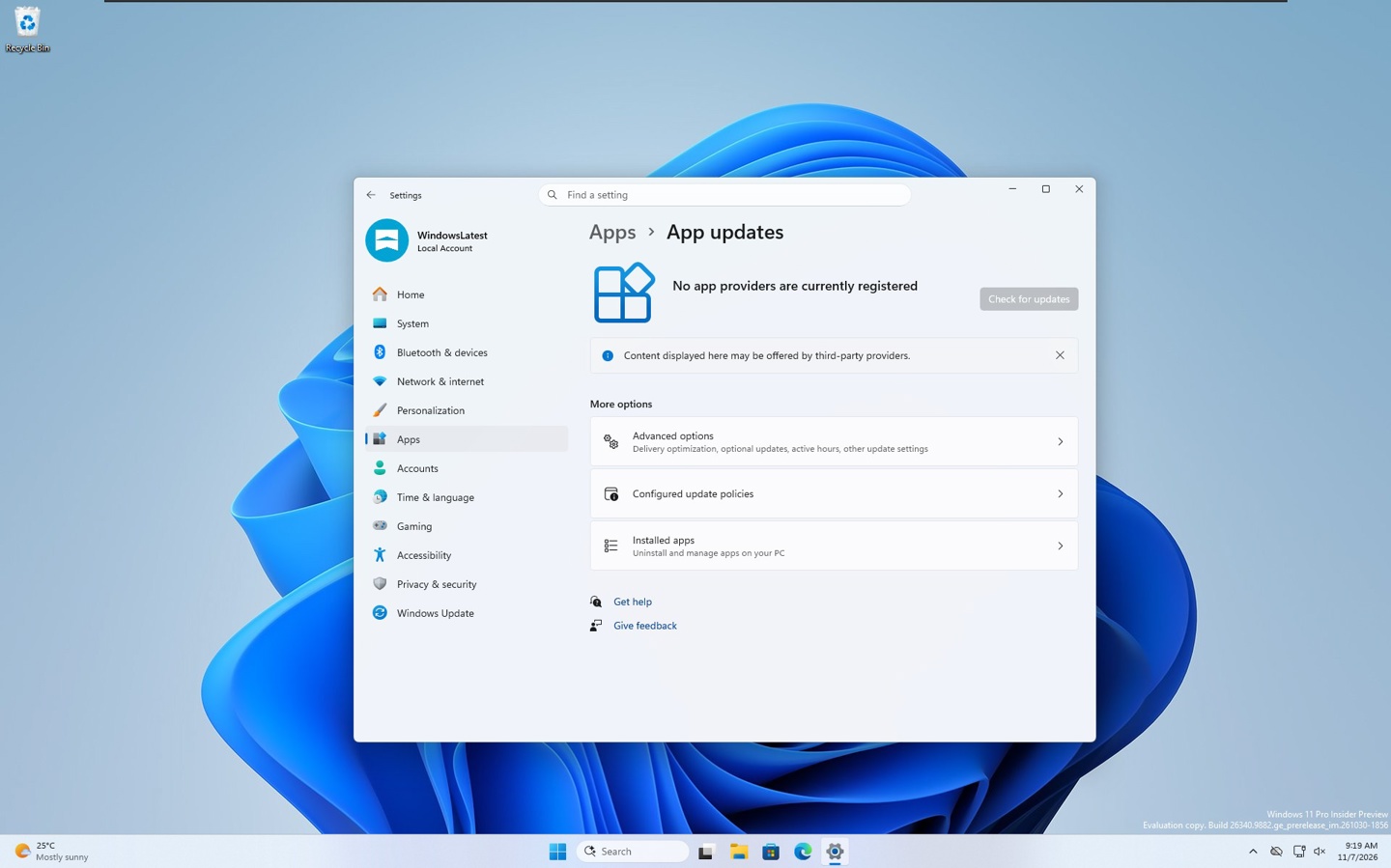
Judging from the appearance of this feature, Microsoft aims to centralize the updates for third-party applications on a single page. In the future, developers will be able to register their own App applications into the unified update system Windows. After that, users will only need to click once with the mouse to update all their applications.
However, so far no developer has completed the registration process, and Microsoft's own applications such as Teams and Outlook are no exception. In addition, within the testing environment, the "Check for Updates" button is grayed out and not available, meaning that this feature is currently not functional.
IT has learned that Windows is currently being managed by Windows Update for system updates, driver updates, as well as updates to Microsoft products such as NET Framework. As for other applications, the situation is quite chaotic. Applications from the MS Store channel can be updated through the store, while traditional desktop applications like Chrome, VLC, and MPV use their respective update services and installers. The system is not even aware of when new versions of these applications are released.
Last year, Microsoft proposed the “Windows Update Orchestration Platform ( UOP, Windows Update Orchestration Platform )” initiative, which allows developers to register application updates as “providers” under Windows 11.
Through this platform, Windows can regularly check whether the applications participating in this program have available updates and coordinate the update installation process at appropriate times. Of course, users can still control these operations on their own. Microsoft does not intend to force developers to abandon their existing update mechanisms, so third-party applications do not need to give up their own update servers or installation logic. Microsoft only provides a unified update orchestration layer in this process.
In addition, Windows can currently only decide for itself when to install system updates. Once this feature is officially launched and third-party applications begin to register as update providers, Microsoft expects to start managing the installation timing of these application updates in a unified manner as well.
It is understood that Microsoft will adopt the intelligent scheduling technology that is currently used for system updates. For example, when arranging updates for third-party applications, Windows will take into comprehensive consideration the user's device usage, battery status, network environment, and system operation status.