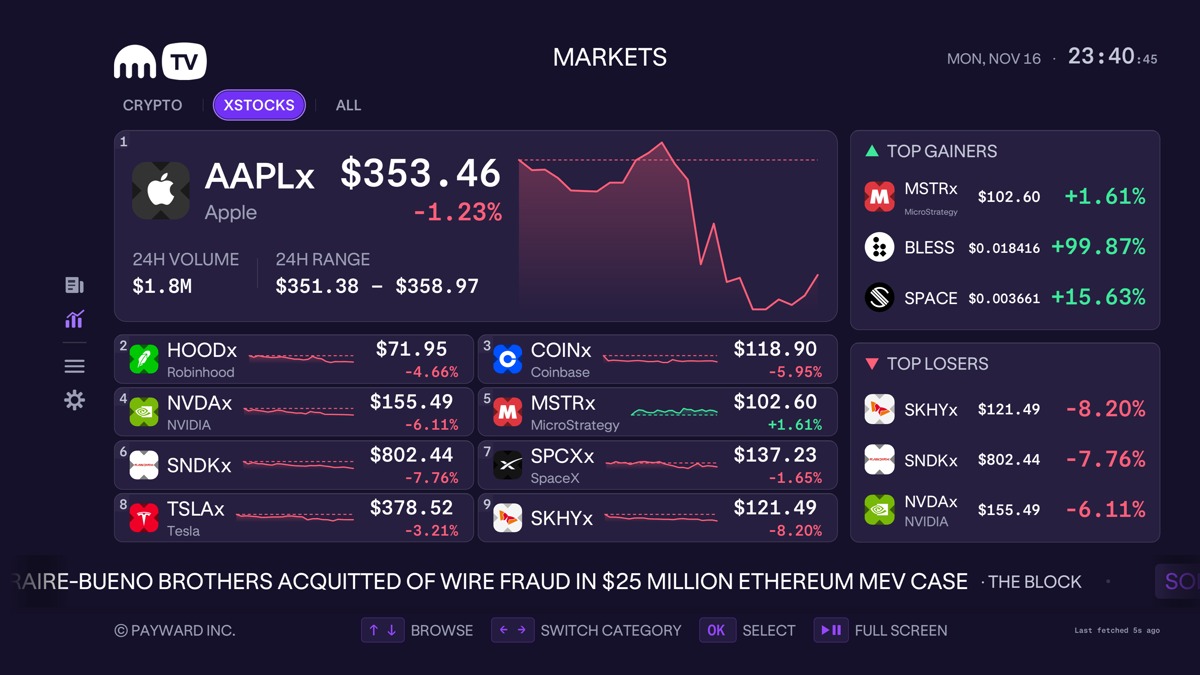









On the 19th of Kraken11, Kraken TV was launched, bringing real-time market data and news to Apple TV, Android TV, and Amazon Fire TV. Installation does not require an account or login, but transactions do not take place on television; users need to scan a code to access the mobile app.
This product is designed for large-screen viewing, and the compatible Android TV also includes Google TV. The official refers to it as a complementary product to the Kraken mobile app, with the focus of the release being on a new news reading experience; the TV is responsible for display and browsing, while the mobile phone handles subsequent transactions, with each screen having its own specific role.
No need to log in first; you can view the market, and then decide whether to enter trading or not.
After the application is opened, the user is directed to the Markets page, which displays real-time prices, 24-hour changes, a brief trend line, and assets with significant fluctuations. Users can arrange the preferred currencies to be displayed through an asset selector, and these selections will follow the user throughout different pages within the application.
This allows someone who frequently checks a small number of cryptocurrencies to not have to search for the same information again and again each time. However, the official party has not announced a maximum delay in market data, a complete list of assets, or the sources of all data. Therefore, the product description that displays real-time information cannot be interpreted as a guarantee of speed suitable for any trading strategy.
News is the core of this release. The information stream prioritizes headlines and can be filtered by category or asset; after opening a news item, users can read the full text directly on the TV. There is also a scrolling Market Wire at the bottom, which continuously displays market updates at the bottom of the screen.
When users come across articles that interest them, they can star them and add them to their saved reading list. The term "saved" here refers to the reading function provided by the app; however, the announcement does not explain the cross-device synchronization mechanism. There is also no explanation regarding how the login-free entry point connects with the mobile account, nor is there any technical description provided.
If a message prompts a user to decide to further investigate or trade, they can scan the QR code on the article and continue within the Kraken app on their mobile phone. The official has repeatedly clarified that no transactions are conducted via television. Therefore, just because a certain asset is displayed on the viewing interface does not mean that the television device itself has the authority to execute trades for that asset.
TV remotes determine how pages are organized.
Kraken TV is designed with remote control operation in mind; the left sidebar leads to different pages, each of which opens in a separate window with a title displayed at the top. It directly indicates the user's current location on the interface, which is different from the quick switching method using touch on mobile phones.
Selecting a particular currency from the asset grid will take you to that currency's dedicated page, which is organized around related news and information. Users can move from an overview of the entire market to specific currencies, and then switch back to mobile notifications. These pathways connect viewing market trends, reading news, and making decisions, but they do not integrate into an automated ordering system.
Upon first opening, the app will ask about the viewing distance before adjusting the layout. Big uses larger text and fewer lines, making it suitable for viewing from a distance; Small displays more detailed information, suitable for close-up viewing; Medium falls in between, allowing users to change their selection at any time.
The three names correspond to different viewing methods and do not represent account levels or trading quotas. The announcement describes three types of reading layouts within the same application; it does not designate any more intensive information as an exclusive feature for advanced trading accounts, nor does it mention any additional trading fees being charged for such features.
For those who need shared space displays, the viewing distance directly affects how much information can be read. This is a usage judgment derived from three different layout differences; the official only states that the application can be used in waiting areas, shared spaces, or as background displays, without providing any test results regarding its effects on transactions.
The always-on screen saver extends the display time, while account actions remain on the other end.
The app also has an ambient screen saver mode. After selecting the currency, relevant prices, news, and events can be continuously displayed on the screen for several hours, preventing the TV from entering sleep mode. It transforms the market information from something that needs to be actively accessed into information that is constantly visible in the space.
The constant brightness effect mentioned here is part of the official product specifications. It cannot be inferred that any television hardware does not consume power or has no display maintenance issues. The press release does not provide these device specifications, nor does it state that continuous viewing will improve decision-making; an increased amount of time spent viewing information is not the same as an improvement in perceived quality.
Observations of exchange products should also be conducted at different levels. Kraken has added a new access point that does not require account login, and then uses QR codes to direct users who are willing to take action towards their mobile phones. From this, we can infer how the product path is designed, but it is not possible to calculate the number of new accounts opened, the number of active users, or the transaction revenue from the announcements.
According to the official statement, this is also the first application of Kraken to enter Amazon Appstore. It also provides download links for the Apple TV store, as well as Google Play and Amazon Appstore. The addition of new distribution channels is a confirmed action, however, the actual number of installations on the three types of television platforms and their regional coverage are not listed in the original text.
The operational standards available to readers are quite straightforward: Kraken TV is responsible for displaying and reading the information, while transactions must be completed through the Kraken mobile application. There is no need to have an account to view the content, but this does not mean that transactions cannot be made without an account; the QR code directs users to another operational environment, and it is still necessary to confirm that the assets displayed on the mobile device match the transaction details before proceeding. This interpretation of the procedures is based on the publicly announced paths and does not assume that any fraudulent incidents have occurred.
This update changes the position where exchange information is displayed to users: market quotes and full-text news are now presented in the "living room" or shared space, with the viewing distance determining the density of the information. Mobile devices still retain the entry points for execution. No conversion data was provided for announcements, but a path has already been established for browsing from large screens to mobile transactions.