











Canva hopes to secure a place in the AI image generation competition.
This design platform launched Canva Craft on Thursday, which is its first image generation model, similar to related products such as Google, Meta, and OpenAI.
Users can use Craft through Dream Lab of Canva. Even free accounts are eligible, but there will be a usage quota limit imposed by AI. You need to log in to your Canva account first before you can start using it.
In the announcement, Canva stated that this tool will first plan and design the layout, proportions, and text before generating the image; this approach is intended to help it produce clearer letters and more accurate details.
In order to test the performance of Canva, Business Insider designed three sets of progressively difficult image generation prompts – ranging from designing a simple greeting card to generating a realistic photo-quality image from scratch.
The following is a comparison of the brand-new image generation tool Canva with three of the most powerful models.
Canva did not respond to the request for comment.
Let's start with illustrations first.
Let's start with a hint from a birthday card.
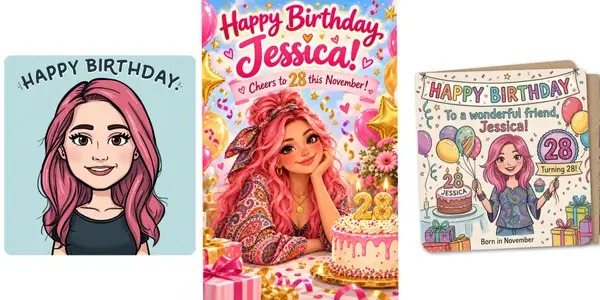
Create a cartoon-style 'Happy Birthday' greeting card for a friend named Jessica. She has pink hair, brown eyes, likes to wear clothing with paisley patterns, and will turn 28 in November.
Surprisingly, the design platform Canva performs poorly in designing birthday cards, with issues ranging from awkward fonts to overly large heads of cartoon characters. It didn't even include any paisley patterns.
In contrast, ChatGPT and Muse understood the task requirements.
ChatGPT guesses that the recipient's favorite color might be pink, while Muse thoughtfully added warm autumn elements suitable for a November birthday.
At the same time, Gemini understood the request literally and generated a real card image. Great job!
Winner: Muse
Edit an image
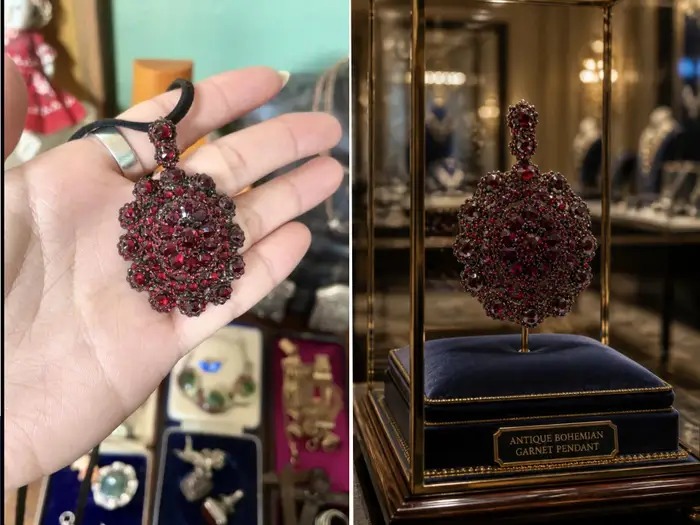
In the second task, I tested the ability of these AI models to recognize an element and place it in a brand-new scenario.
"Edit this photo where I'm holding a necklace pendant. Remove the red garnet pendant from my hand and make it look like it's displayed in a glass showcase in a jewelry exhibition hall."
Canva was able to identify the pendant very well and created a scene with a sense of atmosphere, but like Gemini, the way it presented the jewelry violated physical laws and common sense. It's unrealistic for a pendant to float in the air or rest on a metal rod.
ChatGPT and Muse once again perform better in understanding how objects typically appear in reality. However, Muse made some changes to the pendant that I did not request.
Winner: ChatGPT
Generate photo-quality images from scratch
As Halloween approaches, I request to generate a realistic image of my favorite animal.
Generate a photo-realistic image: a long-haired orange tabby cat, dressed in a Halloween costume with bat wings, squatting on the edge of a Gothic medieval castle, with a full moon and a starless night sky in the background.
Although the cat fur generated by Canva appears a bit too distinct and has a high contrast, there are no missing or deformed parts, and the composition of the image is roughly comparable to the works of Muse and Gemini.
However, in this round, I think the clear winner is ChatGPT.
Not only does the posture of the cat appear more elegant, but the soft light on the left side is also very realistic, and the white balance is well handled as well. There are also gentle clouds around the moon, perhaps in response to my request for a "sky without stars."
Winner: ChatGPT
Overall, compared to other models, Canva still has a lot of room for improvement, especially since it focuses on graphic design. For now, I will continue to manually move each component.