









IT News on September 27th: Microsoft has come up with a new feature that might become the reason for users to choose the new version of Outlook over the classic version Outlook: automatic spell checking before clicking "Send".

According to IT, Outlook originally relied on Microsoft's editor (Microsoft Editor) to provide spell checking, which could detect text errors in real-time as users were composing emails. However, the new feature that Microsoft is about to launch works differently: when a user attempts to send an email containing spelling mistakes, this new feature will proactively intervene to remind the user to correct the errors before sending the email.
Currently, when users write emails on Outlook, they can already see spelling and grammar error suggestions within the editing box. This feature is provided by Microsoft's editor, which is equivalent to Microsoft's own version of Grammarly; however, compared to ordinary individual users, it is more optimized for business scenarios.
But in reality, how many times have we intended to correct mistakes just before sending an email, only to forget about it afterwards and send it out with those spelling errors? Now there is a very straightforward solution: stop the user before the email is actually sent and give them one more chance to make corrections.
The purpose of this newly added automatic spelling check is actually self-evident. Microsoft officially states it as follows: "If users don’t want to manually check the spelling of each email, or are worried about making mistakes, they can set it up so that Outlook will automatically perform the spelling check for them before sending each email."
It is understood that Microsoft does not enable pop-up reminders for spelling errors by default, as frequent pop-ups can easily cause user annoyance.
Many users actually don't mind minor grammatical errors; moreover, the Microsoft editor often gives false alarms. For example, if a user uses the British English spelling “colour” and the system's preferred language is set to American English, the editor will attempt to automatically change it to “color”.
Considering such issues with misjudgment, and also taking into account users' right to autonomous control, Microsoft will not enforce the automatic spelling check before sending. Starting from October 2026, users will be able to manually turn on this feature in their settings.
The classic version Outlook will not implement this automatic spelling check feature before sending. According to the plan, this version will only accept security fixes and optimizations in the future. Updates related to Copilot are considered exceptions.
Another update record from the management center shows that Microsoft is adding a new feature called "User-Initiated Insights ( User Initiated Insights )" to Copilot within the Classic Edition Outlook.
This feature allows users to manually invoke Copilot only when necessary. For example, after selecting a piece of text and clicking "Explain this content," Copilot will then provide a contextual interpretation and analysis based on the selected text.
Microsoft stated: "This upgrade allows users to better control the timing and manner of Copilot's intervention and assistance, directly improving work efficiency, text clarity, and the quality of decision-making within the existing workflow."
Microsoft launched internal testing of this feature in May 2026 and plans to officially roll it out to all users in October 2026.
If users are still not quite clear about the actual use of this feature, they can refer to the screenshot below:
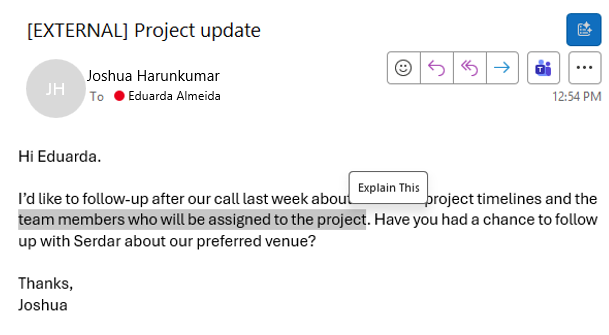
Copilot will no longer pop up automatically from the sidebar or search bar without any warning; it will only be activated manually when the user feels the need for help. After clicking "Explain this text," Outlook will send the selected text to the Copilot sidebar; AI will then attempt to interpret the selected text by considering the full context (the current email as well as past emails).
If users intend to migrate from the Classic Edition Outlook, Microsoft has also prepared relevant solutions to lower the barriers to migration.
The new version Outlook will add a set of themes that replicate the classic version Outlook, making the interface appearance and operating experience more similar to the old version Win32 client.
However, everyone's continued adherence to the classic version Outlook is not merely due to a preference for the interface appearance. In many cases, users prefer the old version because the new version Outlook still lacks several advanced features that are crucial for their daily work processes.